Texas retailers and growing ecommerce teams often reach the same point: the store works, but daily operations have become harder than they should be. Product updates take too long, apps overlap, mobile pages slow down, and important systems do not share data cleanly. A Shopify development company in Texas should help solve those operating problems before adding more features.
WebEscalate provides remote Shopify development for businesses across Texas. The work can cover a new store, a redesign, theme sections, app integrations, custom applications, migration, and post-launch support. The scope starts with what the store needs to do for customers and staff, then turns those requirements into a practical build plan.
Start with store operations before choosing a theme
A useful Shopify project begins with the way the business sells. That includes the product catalogue, variants, inventory ownership, fulfilment rules, discount logic, customer accounts, content approvals, and reporting needs. These decisions affect the theme, app stack, data model, and testing plan.
For example, a Texas wholesaler that serves approved buyers needs a different setup from a direct-to-consumer brand launching seasonal collections. The wholesaler may need customer-specific access, account workflows, and ERP data. The consumer brand may care more about collection merchandising, campaign pages, subscriptions, and fast mobile browsing. Writing these requirements down early reduces rework during development.
When Shopify is a good fit for a Texas business
Shopify is a strong option when a company wants a hosted commerce platform with managed infrastructure, a visual theme system, an established app ecosystem, and APIs for deeper connections. It can support a small catalogue as well as a more complex operation, but the right setup still depends on the sales model and required integrations.
Plan choice also matters. Some checkout customizations and extension points are available only on specific plans. Shopify documents where app blocks can appear in checkout and customer accounts, including areas reserved for Shopify Plus. A developer should confirm these limits before proposing a checkout workflow or estimating the work. Shopify’s checkout app documentation is the clearest place to verify current availability.
Shopify development services for stores, apps and integrations
Store setup and redesign
A new build should establish the catalogue structure, navigation, collections, product templates, policies, analytics setup, and launch checklist. A redesign starts with a review of the current store. Useful findings often include slow templates, duplicated apps, awkward mobile paths, inconsistent sections, and manual work that can be simplified.
The finished store should make common tasks easy for the merchant. Staff should be able to update products, create landing pages, reorder sections, and publish campaigns without editing theme code for routine changes.
Custom Shopify theme development
Custom theme work is useful when an off-the-shelf theme cannot support the content structure, merchandising controls, or customer journey the business needs. The goal is a maintainable theme, not a large collection of one-off templates.
Shopify recommends modular sections and blocks, mobile-first design, accessible markup, and limited JavaScript. Its theme guidance also stresses merchant customization and performance across devices. These principles help a store stay usable as the catalogue and content change. Review Shopify’s theme best practices for the current technical guidance.
App selection and integration
An app can be the fastest answer when it already covers the requirement, has reliable support, and fits the store’s data flow. Every app also adds a dependency. Before installing one, check its permissions, pricing model, theme impact, data ownership, support history, and the work required to remove it later.
Apps may extend the online store, checkout, customer accounts, and Shopify POS. Shopify Functions can also handle areas such as discounts, delivery options, payment customizations, and checkout validation. The exact option depends on the store plan and use case, so each integration needs a technical review and test plan. Shopify explains extensions and Functions in its merchant documentation.
Custom Shopify app development
A custom app makes sense when the process is specific to one business, the available apps cannot meet the requirement safely, or a direct connection is needed between Shopify and another system. Common examples include ERP synchronization, supplier inventory feeds, product configurators, order routing, approval workflows, and internal operations tools.
The app design should define authentication, API access, data storage, error handling, retries, webhooks, monitoring, and ownership before development begins. Shopify’s current app guidance covers APIs, extensions, Functions, metafields, metaobjects, and event-driven integrations. It also distinguishes apps built for one organization from products distributed through the Shopify App Store. See Shopify’s app development overview.
Platform migration
A migration is more than moving products into Shopify. Customer records, order history, redirects, image files, collection rules, search metadata, gift cards, reviews, subscriptions, and connected systems may all need separate handling. The team should decide what moves, what stays archived, and how each data set will be checked.
A controlled migration uses a mapping document, test imports, redirect validation, payment and tax checks, and a cutover plan. Existing URLs should be preserved where possible, with redirects for pages that must change. This protects the customer journey and reduces avoidable search visibility loss.
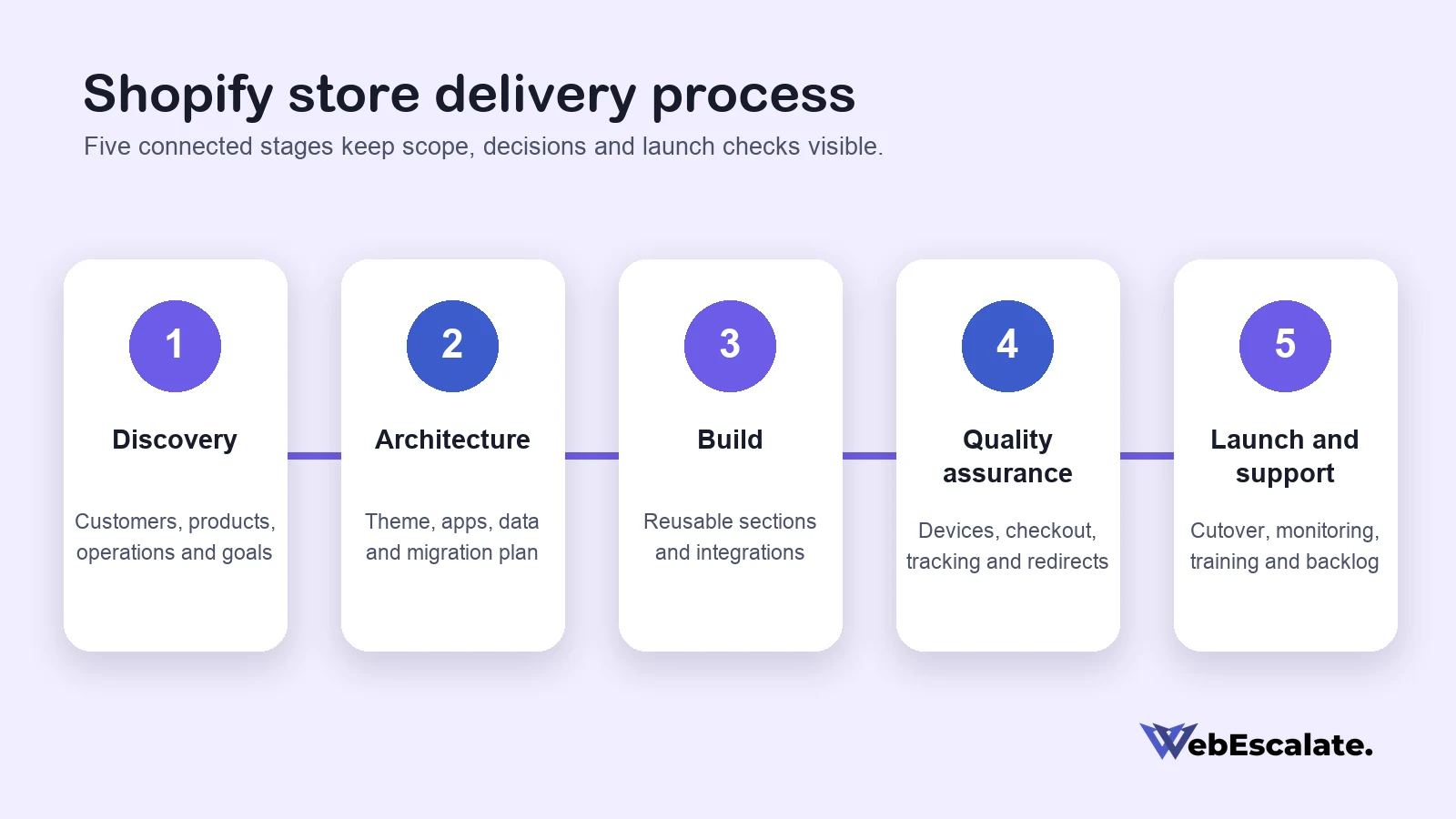
A Shopify delivery process that keeps decisions visible
- Discovery: document customers, products, store operations, business systems, constraints, and success measures.
- Architecture: decide the catalogue structure, theme approach, app stack, data ownership, integration boundaries, and migration plan.
- Design and development: build reusable theme sections, configure Shopify, and implement approved apps or custom integrations.
- Quality assurance: test products, variants, carts, checkout paths, accounts, forms, tracking, redirects, accessibility, and responsive behavior.
- Launch and support: complete the cutover checklist, monitor errors, train store staff, and prioritize improvements from real usage.
The process should leave a clear record of decisions. Store owners need to know which apps are installed, which systems exchange data, who maintains custom code, and how failed jobs are handled. Shopify provides logs for Functions and other development tools, but a project still needs its own support and escalation plan.
Performance, accessibility and maintainability
Store speed depends on the whole storefront, including theme code, images, fonts, scripts, tracking tools, and installed apps. A lightweight theme can still become slow after several marketing and support tools are added. Performance testing should cover the homepage, collection pages, product pages, cart, and other high-traffic templates on mobile connections.
Accessibility belongs in the same review. Headings, labels, keyboard access, focus states, color contrast, image alternatives, and error messages affect whether customers can use the store. Shopify’s theme guidance asks developers to use semantic HTML, accessible components, responsive images, and progressive enhancement. These practices also make future maintenance less fragile.
How to compare Shopify development companies in Texas
Ask each company to explain how it will solve the store’s specific requirements. A useful proposal should identify assumptions, exclusions, dependencies, testing, handover, and ongoing support. It should also separate platform fees, paid app costs, third-party services, and development work.
During the review, look for clear answers to these questions:
- Will the team recommend an existing app before proposing custom development?
- How will theme changes remain editable for store staff?
- Which systems will own product, inventory, customer, and order data?
- How will integration failures be logged, retried, and reported?
- What is included in browser, mobile, accessibility, and checkout testing?
- Who owns the code, accounts, documentation, and deployment process?
- What support is available after launch?
Evidence should match the proposed work. For a theme project, ask to see reusable sections and mobile behavior. For an integration, ask how the team handles authentication, webhooks, failed syncs, and data reconciliation. For an app, ask which Shopify surfaces and distribution method it will use. Shopify’s partner resources confirm that developers can build custom apps, public apps, and themes, with different technical and distribution requirements. Read Shopify’s partner build and integration guidance.
Remote Shopify development for businesses across Texas
WebEscalate serves Texas businesses remotely and does not claim a local Texas office. Remote delivery can work well when the project has a named decision-maker, scheduled reviews, access to the required accounts, and a shared record of decisions. Meetings can cover discovery, design reviews, demonstrations, launch planning, and staff training.
Texas companies can also use WebEscalate for focused work, such as a new theme section, a difficult app integration, a migration plan, or a technical review of an existing store. The Texas web design hub covers related website services, while the Shopify development service page explains the broader ecommerce offering.
Frequently asked questions
How much does Shopify development cost in Texas?
Cost depends on the catalogue, design work, theme customization, migration, app configuration, custom integrations, and testing required. A small store setup and a multi-system build should not share the same estimate. A useful quote lists the assumptions, third-party costs, deliverables, and items outside the scope.
How long does it take to develop a Shopify store?
The schedule depends on how quickly product data, content, design approvals, and third-party access become available. Custom apps and migrations add technical dependencies that need testing. WebEscalate can provide a timeline after reviewing the requirements and identifying the decisions that control the launch date.
Does a Shopify store need a custom app?
Many stores do not. A well-supported third-party app can be the better choice when it meets the requirement and fits the budget. Custom development becomes useful when the workflow is unique, data must move between business systems, or existing apps create unacceptable limits.
Can Shopify connect to an ERP, CRM or inventory system?
Yes, when the other system provides a suitable API, file exchange, or middleware connection. The design should define which system owns each field, how often data moves, and what happens when a sync fails. Authentication, rate limits, retries, webhooks, monitoring, and reconciliation all belong in the plan.
What should post-launch Shopify support include?
Support can cover error monitoring, theme maintenance, app updates, integration failures, staff questions, small improvements, and release planning. The agreement should state response expectations, included hours, emergency contacts, access ownership, and how new work is approved.
Plan the right Shopify build for your business
A store becomes easier to manage when the theme, apps, integrations, and operating process support the same plan. WebEscalate can review a current Shopify store or scope a new build for a Texas business. Share the store requirements to receive a practical recommendation and project estimate.