A Texas business may need a simple marketing site, a member portal, an online store, or a WordPress website connected to the tools its team already uses. Those projects look similar from the outside, but they require different decisions about content, permissions, integrations, hosting, and long-term support.
WebEscalate provides remote WordPress development for businesses in Texas. The work can cover a new site, a careful rebuild, custom plugin development, WooCommerce, or an integration with an existing business system. This guide explains what to define before hiring a WordPress development company in Texas and what a sound delivery process should include.
Start With the Business Requirement, Not a Theme
A useful project brief begins with the action a visitor should take. A service business may want qualified enquiries. A distributor may need a searchable product catalogue. A membership organisation may need protected content and role-based access. The required action shapes the page structure, content, forms, data model, and integrations.
List the people who will use the site and the tasks each person must complete. Include customers, editors, sales staff, administrators, and external partners where relevant. Then identify the systems WordPress must exchange data with, such as a CRM, payment gateway, scheduling tool, email platform, inventory system, or private API.
This work prevents a common problem: choosing a template first and forcing the business process into it later. A clear scope also makes proposals easier to compare because each company is pricing the same set of requirements.
When WordPress Is a Practical Choice
WordPress works well when a team needs control over pages, articles, landing pages, media, and reusable content without asking a developer to make every edit. It can also support ecommerce, gated resources, directories, learning material, and custom workflows when the architecture is planned around the actual requirement.
The platform may be a poor fit when the main product depends on complex real-time behaviour, intensive data processing, or application logic that belongs in a dedicated software system. WordPress can still serve the public website while a separate application handles that work. The correct boundary depends on data, security, performance, and ownership requirements.
A capable development team should explain why WordPress fits the project, which parts need custom code, and which functions can use maintained third-party plugins. That decision affects launch time, maintenance effort, and future compatibility.
WordPress Development Services for Texas Businesses
Custom WordPress websites
A custom build translates approved page plans and visual designs into editable WordPress components. Editors should be able to update normal content without breaking spacing, typography, or responsive behaviour. The build should also define templates for services, articles, case studies, team profiles, and any repeated content type the business needs.
Theme and block development
A custom theme controls presentation without placing business data inside visual settings. Reusable blocks can give editors flexibility while keeping the design consistent. Theme work should account for navigation, keyboard use, heading structure, forms, media, and different content lengths. The WordPress Theme Handbook recommends testing varied content, responsive navigation, accessibility, and performance before release.
Custom plugin development
A plugin is often the right place for features that should continue working if the design changes. Examples include CRM synchronisation, quote workflows, product rules, admin tools, data imports, customer portals, and connections to external APIs. The official Plugin Developer Handbook covers the WordPress hooks, security practices, privacy considerations, and lifecycle methods used for plugin development.
WooCommerce and business integrations
WooCommerce projects may need product configuration, shipping logic, tax settings, payment services, stock connections, subscriptions, or order routing. A proposal should identify which system owns each record and what happens when an external service is unavailable. Integrations also need logging, error handling, credential management, and a recovery process.
Migration and redesign
A redesign should protect useful content and existing search visibility. Before migration, inventory the current URLs, files, forms, metadata, redirects, analytics, and integrations. Build and test the replacement on staging, then verify redirects and critical journeys after launch. If you are comparing a broader redesign, review WebEscalate’s website development services as well as the existing Texas web design guide.
How Custom WordPress Plugins Should Be Built
Custom plugin work needs more than a working demonstration. The developer should document the feature, data it stores, permissions it uses, external services it calls, and what happens during activation, updates, and removal. Site-specific configuration should remain separate from reusable code so a later environment change does not require a rewrite.
Security checks belong inside the implementation. WordPress advises developers to validate and sanitise input, check user capabilities, use nonces where appropriate, and escape output for its context. Its security guidance also recommends using WordPress APIs when they already provide the needed protection. The Plugin Review Team’s list of common plugin issues gives practical examples involving database queries, files, libraries, direct access, and third-party services.
Testing should cover supported WordPress and PHP versions, the active theme, important plugins, user roles, failed API calls, empty data, unusual content, and upgrade paths. For a business-critical plugin, ask how the developer will reproduce problems, apply fixes on staging, and roll back a failed release.
Performance, Mobile Use, and Accessibility
Performance starts with page structure, media handling, queries, scripts, and hosting. It cannot be repaired only by adding a cache plugin at the end. The project should set a measurement method before launch and test representative templates on both mobile and desktop connections.
Google uses the mobile version of a page for indexing and recommends responsive web design because it serves the same content and URL across devices. Its mobile-first guidance also stresses that important content, metadata, images, and structured data must remain available on mobile. Core Web Vitals measure loading performance, responsiveness, and visual stability through real-world user experience data.
Accessibility should be included in the specification and testing plan. WordPress describes accessible content as perceivable, operable, understandable, and compatible with a range of user agents. Practical checks include keyboard navigation, visible focus, labels, headings, colour contrast, form errors, link purpose, and text alternatives. Automated tools help find some issues, but manual testing is still necessary.
A Delivery Process That Keeps the Project Reviewable
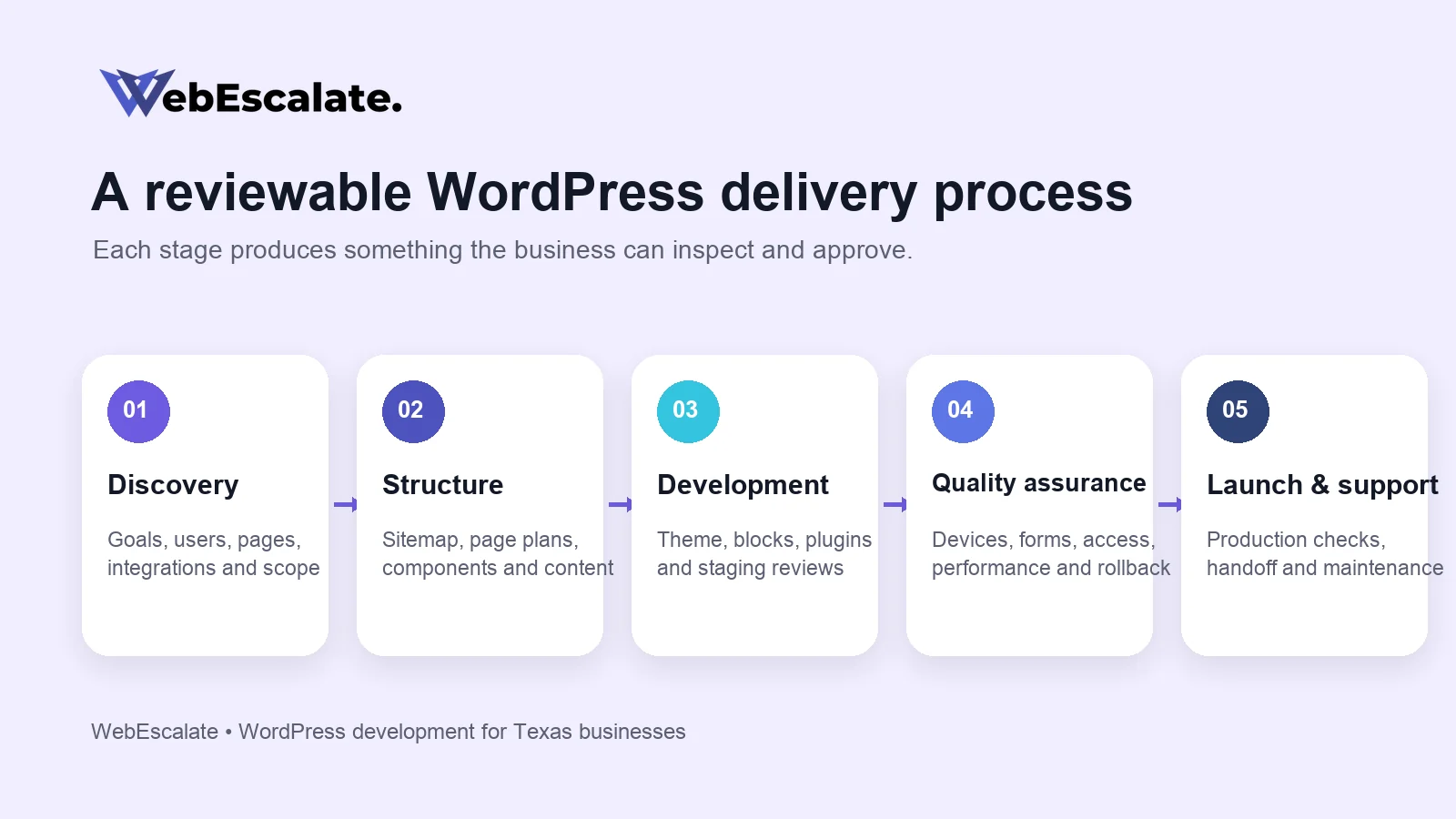
- Discovery and scope: define audiences, goals, pages, content ownership, integrations, constraints, and acceptance criteria.
- Structure and design: approve the sitemap, page plans, reusable components, mobile behaviour, and primary conversion paths.
- Development on staging: build the theme, blocks, plugins, and integrations in an environment that can be reviewed safely.
- Content and migration: prepare final text and media, map old URLs, import records, and check formatting on real templates.
- Quality assurance: test devices, browsers, forms, permissions, integrations, accessibility, performance, analytics, backups, and rollback steps.
- Launch and handoff: deploy the approved version, verify production behaviour, document access and maintenance, and train the people who will manage content.
Each stage should produce something the business can review. This reduces late surprises and gives both sides a shared definition of completion.
How to Compare WordPress Development Companies
Search phrases such as WordPress developers near me or WordPress development near me can produce a long list of companies and freelancers. Location is one factor, but the working process usually matters more for a remote project. Ask who will plan the architecture, write the code, run QA, and support the site after launch.
Review examples that resemble the required work. A marketing-site portfolio does not prove experience with private APIs, WooCommerce rules, or a custom admin workflow. Ask the company to explain a relevant technical decision, what alternatives it considered, and how the result is maintained.
The proposal should identify deliverables, exclusions, milestones, dependencies, content responsibilities, licensing, code ownership, hosting assumptions, warranty terms, and ongoing support. It should also explain how scope changes are estimated and approved. A vague fixed price can hide more risk than a detailed estimate with clear assumptions.
Remote WordPress Development for Texas
WebEscalate works remotely with businesses that need WordPress design, development, custom plugins, integrations, migration, and ongoing technical support. A remote engagement can use documented requirements, scheduled reviews, staging links, issue tracking, and recorded handoff material. This page does not claim a WebEscalate office in Texas.
Texas relevance should come from the buyer’s service requirements, target customers, and operational needs. City names and local keywords should not be inserted into unrelated sections. If a project needs location-specific landing pages, each page should contain useful information for that market and connect to a real service or delivery capability.
Frequently Asked Questions
How much does WordPress development cost in Texas?
Cost depends on the number of templates, content work, custom functionality, integrations, ecommerce rules, migration effort, testing, and support requirements. A useful estimate starts with an agreed scope and assumptions. WebEscalate has not published a fixed Texas price range in this article because no single range fits these different project types.
How long does it take to develop a WordPress website?
The timeline depends on how quickly requirements, designs, content, integrations, and reviews are completed. A small site with approved content can move faster than a migration or a project with custom plugin development. The proposal should separate client dependencies from development and QA time.
Can WordPress support custom business workflows?
Yes, when the workflow fits the platform and the integration is designed carefully. A custom plugin can connect forms, user roles, admin screens, scheduled jobs, external APIs, and reporting. Complex application logic may belong in a separate service connected to WordPress.
Will the business own the website and custom code?
Ownership and licensing should be stated in the proposal. Ask who owns custom code and design files, which third-party licences must be renewed, where the site is hosted, and how access is transferred. Open-source components retain their applicable licences.
Does a WordPress site need ongoing maintenance?
WordPress core, plugins, themes, hosting, backups, and integrations change over time. Maintenance should include an update method, staging or rollback where needed, security monitoring, backup verification, uptime checks, and a route for urgent issues. The exact plan depends on how critical the website is to the business.
Plan the WordPress Project Around What the Business Must Do
A WordPress build is easier to estimate and maintain when the project begins with pages, workflows, users, data, and ownership. WebEscalate can review those requirements and recommend a practical architecture for a new website, plugin, integration, migration, or redesign. Contact WebEscalate with the current site, required features, target launch window, and systems that need to connect.