Ecommerce website development in Sarjapur Road Bangalore should begin with the way a retail business manages products, stock, payments, orders, delivery, and returns. A polished storefront can still fail when product data is incomplete, inventory rules are unclear, or an order never reaches the team responsible for fulfilment.
Growing retailers often need more than a theme and payment button. They need a store that fits the catalogue, back-office tools, delivery model, and information customers use to make a purchase. This guide explains the decisions to settle before development, the systems to test, and the evidence to request from a development partner. It does not claim a WebEscalate office on Sarjapur Road or promise sales results that have not been measured.
What ecommerce website development in Sarjapur Road Bangalore should clarify first
Start with the retail operating model. Record what the business sells, who owns product information, where stock is held, how prices change, which locations fulfil orders, and how returns are handled. Add the payment methods, delivery areas, tax inputs, customer-support process, and reports the team already uses. These choices affect platform configuration and custom development.
A single-location catalogue with a few stable products needs a different setup from a brand with many variants, frequent launches, wholesale customers, or stock split across locations. Shopify’s guidance on inventory and locations describes inventory as the quantity available for sale and provides tools for quantities, transfers, and purchase orders. The implementation still needs written rules for when stock is reserved, reduced, returned, or corrected.
Prepare a short discovery pack before choosing a platform:
- a sample product catalogue with variants, identifiers, prices, images, and stock fields;
- the current order, fulfilment, cancellation, exchange, and refund process;
- the payment, shipping, accounting, CRM, marketplace, and warehouse tools that must connect;
- the people who can approve product data, design, integrations, and launch;
- the reports needed for merchandising, operations, finance, and marketing.
This pack exposes missing ownership early. It also prevents a developer from treating an operational requirement as a late design change.
Build the catalogue before designing the storefront
The catalogue is the store’s working data model. Define product names, categories, collections, variants, attributes, identifiers, prices, availability, media, shipping details, and search filters. Decide which fields are mandatory and which system owns each field. If two systems can change the same stock or price value, the team needs a conflict rule.
Use customer language for categories and filters. A retailer may manage products around supplier codes, but shoppers often browse by product type, use case, material, size, colour, compatibility, or delivery need. Test navigation with real catalogue examples, including products that belong in more than one collection and variants that become unavailable.
Google’s ecommerce guidance explains that a clear site structure and product data help search systems find and understand store content. Category, subcategory, and product pages should connect through visible navigation and internal links. Important products should not depend on a site-search box or a script that search crawlers cannot reliably follow.
Choose a platform around operations and ownership
Shopify, WooCommerce, and a custom commerce stack can all support online retail. The better choice depends on the team’s catalogue, workflows, integration depth, maintenance capacity, and need for control. A platform decision should document what works through configuration, what requires an app or plugin, what needs custom code, and who will maintain each part.
Shopify can reduce infrastructure work and provides a managed admin for products, orders, and inventory. The Shopify development service can be relevant when a retailer wants theme work, catalogue setup, app configuration, or integrations within that platform. The scope should still identify recurring app costs, data ownership, theme constraints, and the effect of platform updates.
WooCommerce can suit a business that already uses WordPress or needs deeper control over content and store behavior. Its official webhook documentation shows that store events such as orders, products, coupons, and customers can notify external services. Those integrations require authentication, error logging, duplicate handling, retry rules, and a way to recover when the receiving system is unavailable.
Custom development makes sense only when the business requirement cannot be handled safely through supported platform features and extensions. The proposal should explain the reason for each custom component, its test coverage, hosting and security responsibilities, upgrade path, documentation, and handover. WebEscalate’s website development service can support that broader engineering scope when the work goes beyond a standard store build.
Design product discovery and checkout around customer decisions
Product pages need enough information for a customer to judge fit without contacting support for routine questions. Use accurate images, variant choices, dimensions or compatibility details where relevant, price, availability, delivery information, returns guidance, and a clear purchase control. Do not copy supplier descriptions across many products if they fail to answer the questions buyers ask.
Search, category filters, sorting, and product recommendations should use dependable catalogue fields. Test misspellings, alternate names, empty results, out-of-stock variants, and products with incomplete attributes. A filter that returns inconsistent results creates doubt even when the product page itself looks good.
Checkout should ask only for information required to take payment, deliver the order, meet the business’s obligations, and support the customer. Show costs and delivery choices before the final confirmation where the platform permits it. Test successful and failed payments, duplicate clicks, abandoned sessions, coupon rules, address errors, and the confirmation messages sent to both customer and staff.
Connect catalogue, inventory and fulfilment before launch
An online order affects several records. The storefront creates the order, the payment provider returns a result, inventory changes, staff or a fulfilment partner receives the request, and the customer expects updates. Write the source of truth for products, stock, orders, payments, shipments, cancellations, and refunds before connecting systems.
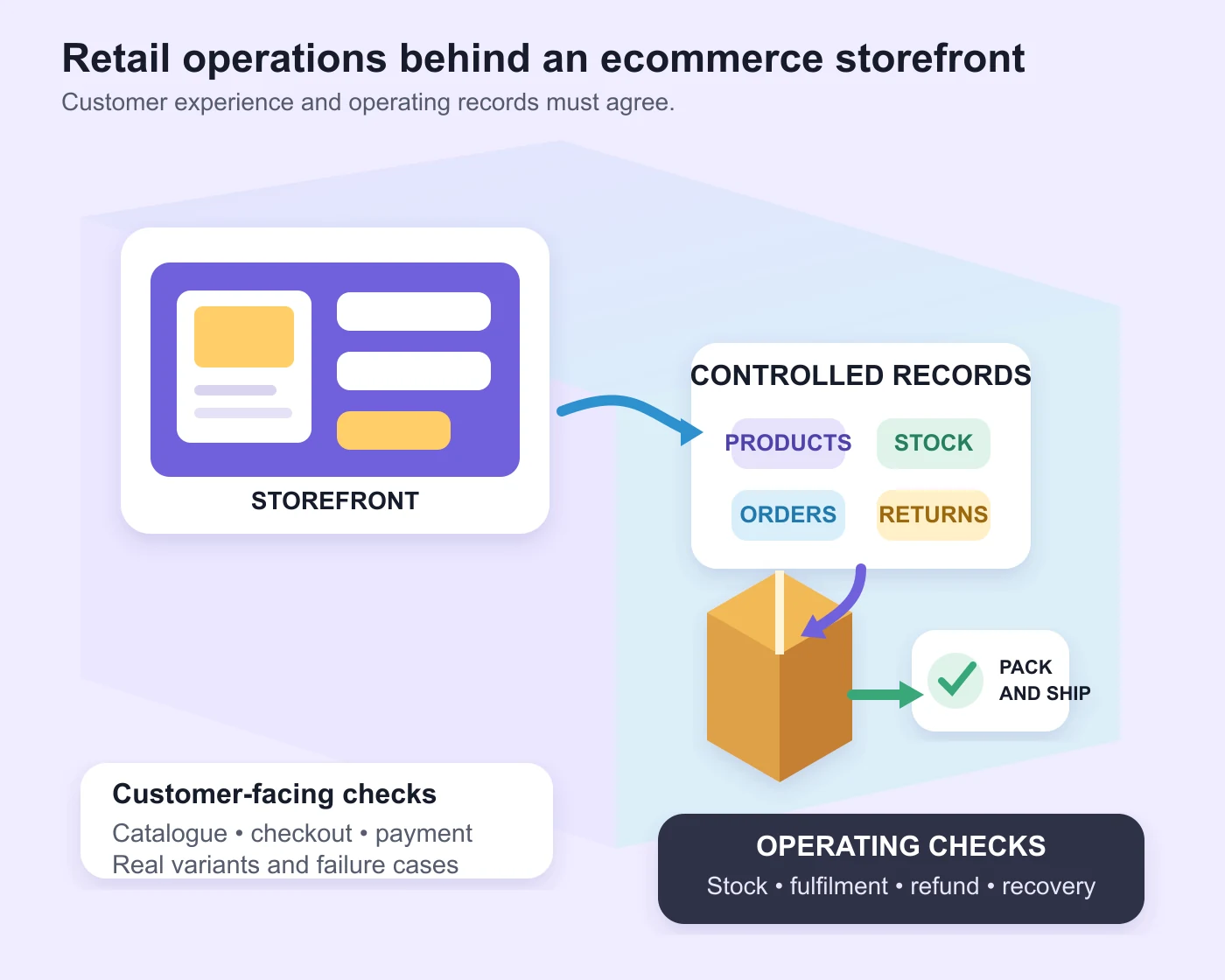
Each integration needs a field map and an event map. The field map shows where identifiers, prices, stock quantities, customer details, and order statuses live. The event map shows what happens after a product update, order creation, payment failure, cancellation, shipment, or refund. Record validation rules, retries, alerts, and manual recovery steps.
Shopify’s inventory setup guidance lets merchants control tracking, out-of-stock behavior, and availability by location. WooCommerce webhooks can notify external systems when supported events occur. Neither feature removes the need to test timing, duplicated events, partial failures, and staff corrections with the retailer’s actual tools.
Prepare ecommerce SEO and product data during development
Search visibility should be part of the build, not a plugin installed after launch. Plan readable product and category URLs, unique titles and descriptions, indexable navigation, canonical handling, image text alternatives, sitemaps, redirects, and rules for filters or internal search pages. The exact setup depends on the platform and catalogue.
Google lists structured data types relevant to ecommerce, including product and breadcrumb information. Its Product structured data guidance explains how product details such as price, availability, shipping information, and return policies can help Google understand eligible pages. Markup must match the visible product and current business policy. It should not contain invented ratings or stale availability.
The store also needs a content and promotion plan. The digital marketing service in Bangalore can support search, campaigns, and landing-page work after the catalogue and measurement foundation is reliable. Marketing should not launch against products that staff cannot fulfil or pages that have not passed checkout testing.
Measure the shopping journey with tested events
Define the decisions each report should support before adding tracking. Useful ecommerce questions include which products people view, where they leave checkout, which promotions receive engagement, what is purchased, and whether refunds are recorded consistently. Avoid collecting events that no one plans to review.
Google Analytics provides recommended ecommerce events for actions such as viewing items, adding to cart, beginning checkout, purchasing, and refunding. These events require implementation and validation; they are not all collected automatically. Test the event names, parameters, item arrays, currency, value, and transaction identifiers in a staging environment and after launch.
Analytics totals will not always match operational reports because the tools have different purposes, timing, consent conditions, and failure modes. The project should state which system owns financial reporting and how marketing data will be reconciled. Never present a generated dashboard as evidence of real sales.
Run launch tests with real retail scenarios
A launch checklist should cover products, variants, search, filters, mobile layouts, accessibility, account flows, checkout, payment outcomes, tax and shipping rules, emails, inventory changes, fulfilment, cancellation, refund, analytics, SEO, security, backups, and staff access. Use test products and controlled orders, then remove or clearly separate them from live reporting.
Assign an owner to every failed test and set a release decision for issues that remain open. Prepare rollback steps, support contacts, and the first days of monitoring. Staff should know how to pause sales, correct stock, refund an order, and record an incident without waiting for a developer to explain the store.
A development proposal should separate discovery, catalogue preparation, design, platform configuration, custom development, integrations, migration, testing, training, launch, and ongoing support. Ask for the assumptions and exclusions behind any cost or timeline. WebEscalate can review the operating model and technical scope without claiming a Sarjapur Road office or an unverified retail result. Share the current catalogue, platform, integrations, and launch constraints through the contact page.
Frequently asked questions
How much does ecommerce website development cost in Bangalore?
Cost depends on catalogue size, platform, custom design, product migration, payment and shipping setup, integrations, content, testing, training, and support. Request an itemised scope that separates one-time development, platform subscriptions, paid apps, transaction-related charges, and ongoing maintenance. A price without those assumptions is difficult to compare.
How long does it take to develop an ecommerce website?
The timeline depends on catalogue readiness, design approvals, integrations, migration, payment onboarding, content, and testing. A small configured store and a multi-system retail build need different plans. Ask for milestones, approval owners, required client inputs, and the conditions that can move the launch date.
Should a growing retailer choose Shopify or WooCommerce?
Choose after comparing catalogue needs, operational workflows, required integrations, maintenance capacity, content requirements, and ownership preferences. Shopify offers a managed commerce platform. WooCommerce provides WordPress-based control and extension options. The implementation quality and operating process matter as much as the platform name.
What should be tested before an ecommerce website goes live?
Test product data, variants, stock behavior, search, filters, mobile use, checkout, successful and failed payments, shipping, tax inputs, confirmation messages, order routing, fulfilment, cancellation, refunds, analytics, indexing controls, redirects, backups, permissions, and recovery steps. Run the checks with realistic scenarios and record who approves the release.