Many Texas businesses start looking at AI after a manual process becomes difficult to manage. Leads wait for a response, staff copy information between systems, support requests arrive without enough context, or reports depend on the same spreadsheet work every week. An AI automation agency in Texas should begin with that operating problem and show how a controlled workflow could improve it.
WebEscalate provides AI and workflow automation services remotely for businesses across Texas. A project may connect forms, inboxes, customer relationship management systems, internal databases, support tools, and approval steps. The design should define what the system can do, what still needs human judgment, and what happens when data or an external service fails.
What does an AI automation agency do?
An AI automation agency studies a business process, identifies repeatable decisions, and builds a workflow that moves information between the required systems. Traditional automation follows fixed rules. AI can add useful interpretation, such as classifying a request, extracting fields from a document, drafting a response, or summarizing a conversation.
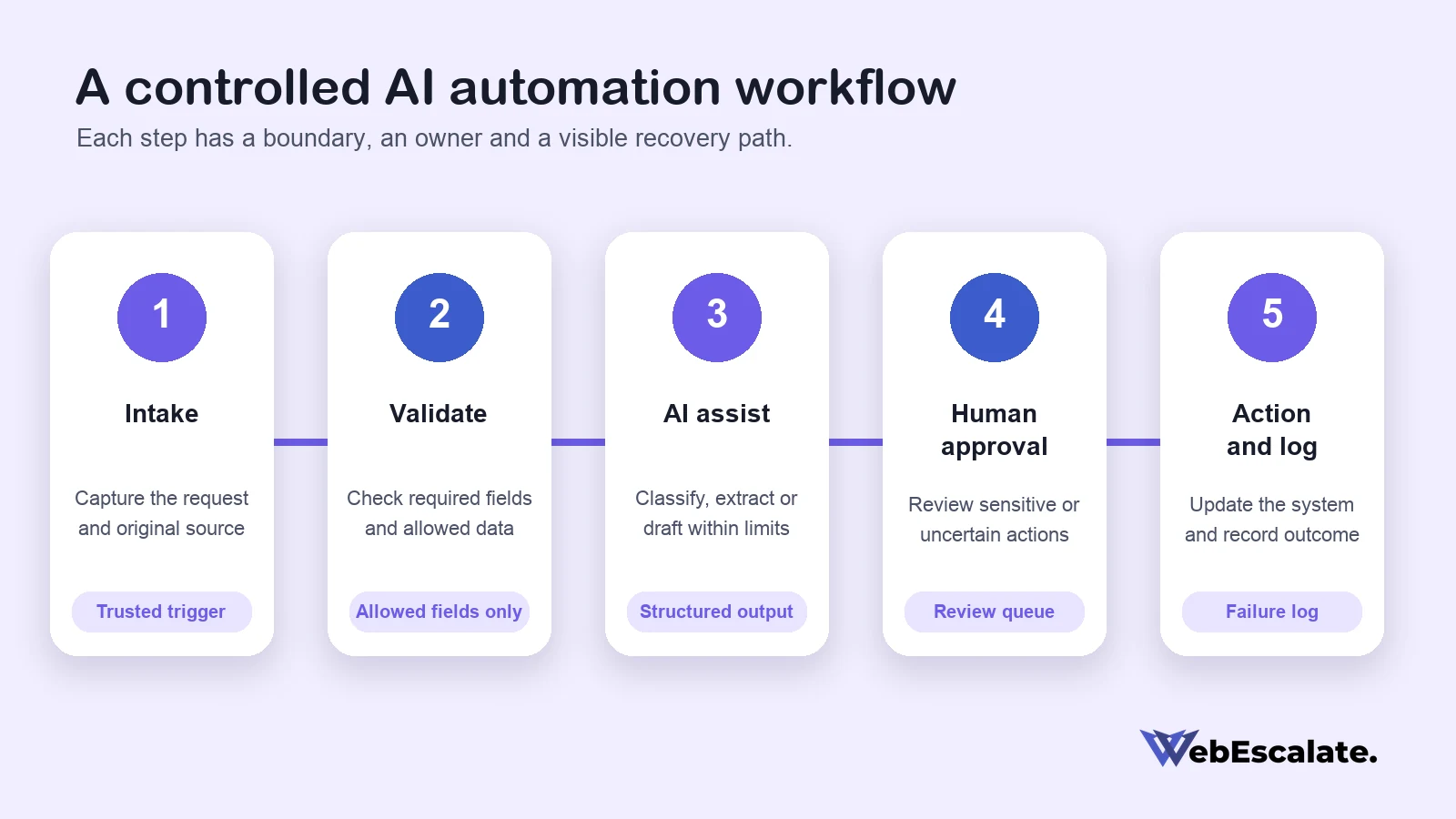
The useful part is the complete workflow around the model. It needs validated inputs, defined outputs, access controls, error handling, logs, and a clear owner. The model may help with one step, while ordinary rules and APIs handle the rest. This makes the process easier to test and gives the business a practical way to review problems.
Choose the first workflow from a real bottleneck
A first project should solve a process that happens often enough to measure. Teams can start by listing the trigger, current steps, systems involved, manual decisions, exceptions, and final result. They should also record how long the work takes and where errors or delays occur.
A suitable starting workflow usually has a stable input, a repeatable output, and a person who owns the result. High-risk decisions need more controls and may be poor choices for the first release. NIST’s voluntary AI Risk Management Framework organizes risk work around four functions: govern, map, measure, and manage. It also calls for clear roles and responsibilities across the AI lifecycle. Review the NIST AI Risk Management Framework.
Practical AI automation services for Texas businesses
Lead intake and CRM workflows
A lead workflow can collect an enquiry, check required fields, classify the request, create or update a CRM record, notify the correct owner, and prepare a draft follow-up. Rules should prevent duplicate contacts and flag missing information. A salesperson should approve sensitive or high-value responses before they are sent.
The workflow can also preserve the original enquiry beside the AI-generated summary. That gives the reviewer enough context to correct a classification or response rather than trusting a summary on its own.
Customer support triage
AI can label incoming tickets, identify the product or service involved, suggest a priority, and retrieve an approved knowledge article. Straightforward requests may receive a draft reply, while billing disputes, complaints, account changes, and unclear requests move to a person.
The system should show why a ticket was routed and keep the original message available. OpenAI’s current safety guidance recommends human review before outputs are used in practice, especially when mistakes carry higher consequences. It also recommends testing applications against normal and adversarial inputs. See OpenAI’s safety best practices.
Document processing and internal reporting
A document workflow can extract fields from invoices, forms, proposals, or service reports and place them in a structured record. Validation rules should check required fields, formats, totals, and duplicates before another system receives the data. Low-confidence or inconsistent records should enter a review queue.
Reporting workflows can collect data from approved systems and prepare a recurring summary. The design should separate source data from generated commentary so staff can trace each figure back to its origin. An AI-generated explanation should never become the only record of a business result.
Sales and operations handoffs
Many delays occur between teams. A signed proposal may need to create a project, notify operations, assign tasks, request missing assets, and schedule a kickoff. Automation can coordinate those steps while preserving approval for scope, pricing, contract terms, and customer commitments.
Each handoff needs an owner and a visible status. If a record cannot move forward, the workflow should say why and place it in a queue instead of silently dropping it.
Build human approval into the workflow
Human oversight works best when the reviewer has a specific decision to make. A vague approval screen creates more work and may encourage quick confirmation. The system should show the original input, proposed action, important source data, and any uncertainty or rule that triggered review.
Approval is especially useful before sending external messages, changing a customer record, issuing a refund, placing an order, publishing content, or making another action that is difficult to reverse. OpenAI’s agent safety guidance recommends structured outputs to constrain data moving between workflow steps and approvals for tool operations. Those controls reduce the chance that untrusted text directly drives a sensitive action. Read the agent safety guidance.
Define data access before connecting AI
A workflow should receive only the data it needs for the assigned task. The project plan should identify each data source, the fields being read, where generated information is stored, how long logs are retained, and which users can view or change the workflow. Credentials should stay in a protected secret store rather than inside prompts, workflow notes, or browser code.
Texas businesses also need to consider the Texas Data Privacy and Security Act when personal data is involved. The Texas Attorney General explains that the law applies to certain entities conducting business in Texas or providing products and services consumed by Texas residents. Covered controllers have duties involving privacy notices, data minimization, security practices, processor contracts, consumer requests, and assessments for some higher-risk processing. Applicability depends on the business and use case, so legal questions should go to qualified counsel. Read the Texas Attorney General’s TDPSA overview.
Plan for failures, retries and logs
Every connected service can fail, return incomplete data, or enforce a rate limit. A dependable automation distinguishes between a temporary error and a business-rule problem. Temporary connection errors may be retried with a limit and delay. Missing required information usually needs a review queue because repeating the same request will not fix the record.
The workflow should log the run ID, time, step, status, and useful error context without copying sensitive content into logs unnecessarily. Alerts should reach the person responsible for recovery. Official Make documentation describes error handlers, incomplete executions, and retries for interrupted scenarios. See Make’s error-handling overview. n8n similarly supports dedicated error workflows and saved execution details for investigation. See n8n’s error-handling documentation.
Measure the workflow after launch
Success measures should come from the original bottleneck. Useful measures may include completion time, completion rate, exception rate, duplicate rate, human corrections, and time spent in the approval queue. A lead workflow may also track response time and the number of qualified requests that reach the correct owner.
The team should compare these measures with a baseline from the old process. Early reviews often reveal missing exception rules or unclear ownership. Changes should be tested on a small sample before they affect every live record. NIST’s framework treats measurement and ongoing management as connected parts of AI risk work, which fits this operating cycle.
How an AI automation project is delivered
- Process discovery: map the current steps, owners, systems, inputs, decisions, exceptions, and desired result.
- Workflow design: decide which steps use fixed rules, which may use AI, and where human approval is required.
- Access and data planning: define credentials, permissions, fields, retention, privacy requirements, and system ownership.
- Build and testing: connect a test environment, create validation and error paths, then test normal and difficult cases.
- Controlled launch: begin with a limited group or workload, review logs and exceptions, and expand after the results are stable.
- Maintenance: monitor failures, platform changes, model behavior, cost, permissions, and the measures agreed at the start.
The handover should include a workflow diagram, connection inventory, owner list, approval rules, known limitations, recovery steps, and change process. This documentation helps the business maintain the automation if a tool, API, or employee responsibility changes.
How to compare AI automation agencies in Texas
A useful proposal should explain the workflow in business terms and show how the technical parts support it. Ask the agency to identify the systems it will connect, the data each step can access, the actions the AI can request, and the approvals that remain with staff.
- Which process and baseline will the first release address?
- How are normal rules separated from AI-generated decisions?
- Where can staff review, correct, pause, or override the workflow?
- What data reaches the model and which provider settings apply?
- How are permissions, secrets, retries, duplicate actions, and logs handled?
- What tests cover missing data, unusual requests, prompt injection, and service outages?
- Who owns the accounts, code, workflow definitions, and documentation?
- What support is included after launch?
Avoid judging a proposal only by the number of AI tools it mentions. The clearer test is whether the team can explain the process, risks, controls, maintenance, and expected operating result without inventing savings or promising perfect accuracy.
Remote AI automation services across Texas
WebEscalate serves Texas businesses remotely and does not claim a Texas office. Discovery sessions, system reviews, demonstrations, staff approvals, training, and support can all happen through a documented remote process. Access can be introduced in stages so the workflow is tested before it receives broader permissions.
The workflow automation service page covers the wider automation offering. Businesses planning connected website work can also review the Texas web design hub.
Frequently asked questions
What do AI automation agencies do?
They map business processes, connect software, add rule-based and AI-assisted steps, test the workflow, and support it after launch. The work may include classification, data extraction, summaries, routing, draft responses, and system updates. A responsible design also includes approvals, permissions, logs, and recovery paths.
Can AI automate an entire business process?
Some routine processes can run with little intervention after careful testing. Others need people to review sensitive decisions, exceptions, or external actions. The right level of automation depends on the quality of the input, consequence of an error, legal duties, system reliability, and ability to reverse the action.
How much do AI automation services cost?
Cost depends on the number of systems, data quality, workflow complexity, model usage, security requirements, testing, and ongoing support. Platform subscriptions and usage fees may sit outside the development fee. A proposal should separate discovery, implementation, third-party costs, maintenance, and future changes.
How long does an AI automation project take?
The schedule depends on access to the required systems, clarity of the process, number of exceptions, and approval speed. A focused workflow can be scoped more reliably than a broad request to automate a department. WebEscalate provides a timeline after reviewing the process and technical dependencies.
Which business process should be automated first?
Start with a frequent process that has a clear owner, consistent inputs, visible delays, and a measurable result. Avoid starting with a high-stakes decision that has unclear rules. A short discovery review can compare candidate workflows and identify the safest useful starting point.
Plan a controlled first workflow
A practical AI project begins with one business bottleneck and a clear boundary around data and actions. WebEscalate can review the current process, identify automation options, and prepare a workflow plan for a Texas business. Share the process that is taking too much manual work to discuss the next step.