An AI automation agency in Mahadevapura Bangalore should begin with one real business workflow, not a list of tools. The useful starting point is a process with a named owner, repeated work, clear records, and a problem that staff can describe. That might be lead routing, document review, customer support triage, purchase approval, service scheduling, or updating a CRM after a verified event.
This guide is for businesses evaluating automation support in or around Mahadevapura. It explains how to choose a first workflow, decide where AI belongs, keep people responsible for consequential actions, and compare implementation proposals. It does not claim that WebEscalate has a Mahadevapura office, a local client result, a fixed delivery time, or guaranteed savings.
What an AI automation agency in Mahadevapura Bangalore should map first
Write the current workflow before discussing an AI model or automation platform. Record the trigger, each handoff, the system used at that step, the data read or changed, the exceptions, and the final outcome. If staff keep a spreadsheet beside the official system, include it. Side records often reveal missing fields, manual reconciliation, or rules that the main application does not support.
A discovery session should answer practical questions:
- Who owns the process and who may approve changes?
- Which system is the source of truth for each important record?
- What information may enter an AI service, and what must stay outside it?
- Which actions can be reversed, and which can affect money, access, customers, or public communication?
- How will staff know that the workflow completed, paused, or failed?
The broader AI automation agency in Bangalore guide covers city-level service evaluation. WebEscalate’s workflow automation service covers process mapping and implementation. This Mahadevapura page concentrates on control design for one operational workflow.
Separate deterministic automation from AI decisions
Many workflows need ordinary rules more than a model. A system can validate required fields, assign a record based on territory, copy approved data, send a scheduled reminder, or update a status with deterministic logic. These steps are easier to test because the same input should produce the same expected result.
AI is more suitable when the work includes language, classification, extraction, summarisation, or a recommendation that depends on context. Examples include classifying an enquiry, extracting fields from varied documents, drafting a response for review, or suggesting a next step from case notes. The proposal should state what the model produces, how the output is checked, and what happens when confidence or input quality is inadequate.
The NIST AI Risk Management Framework Core recommends testing AI systems before deployment and while they operate. It also treats documentation, measurement and monitoring as part of responsible use. A workflow design should therefore include test cases, known limits, review rules and an owner for production performance.
Classify actions before choosing an approval model
Approval should depend on the action, not on whether the workflow uses an AI label. Reading a public document carries a different risk from changing a supplier bank account or sending an external message. Classify each action by reversibility and impact, then choose the control that fits it.
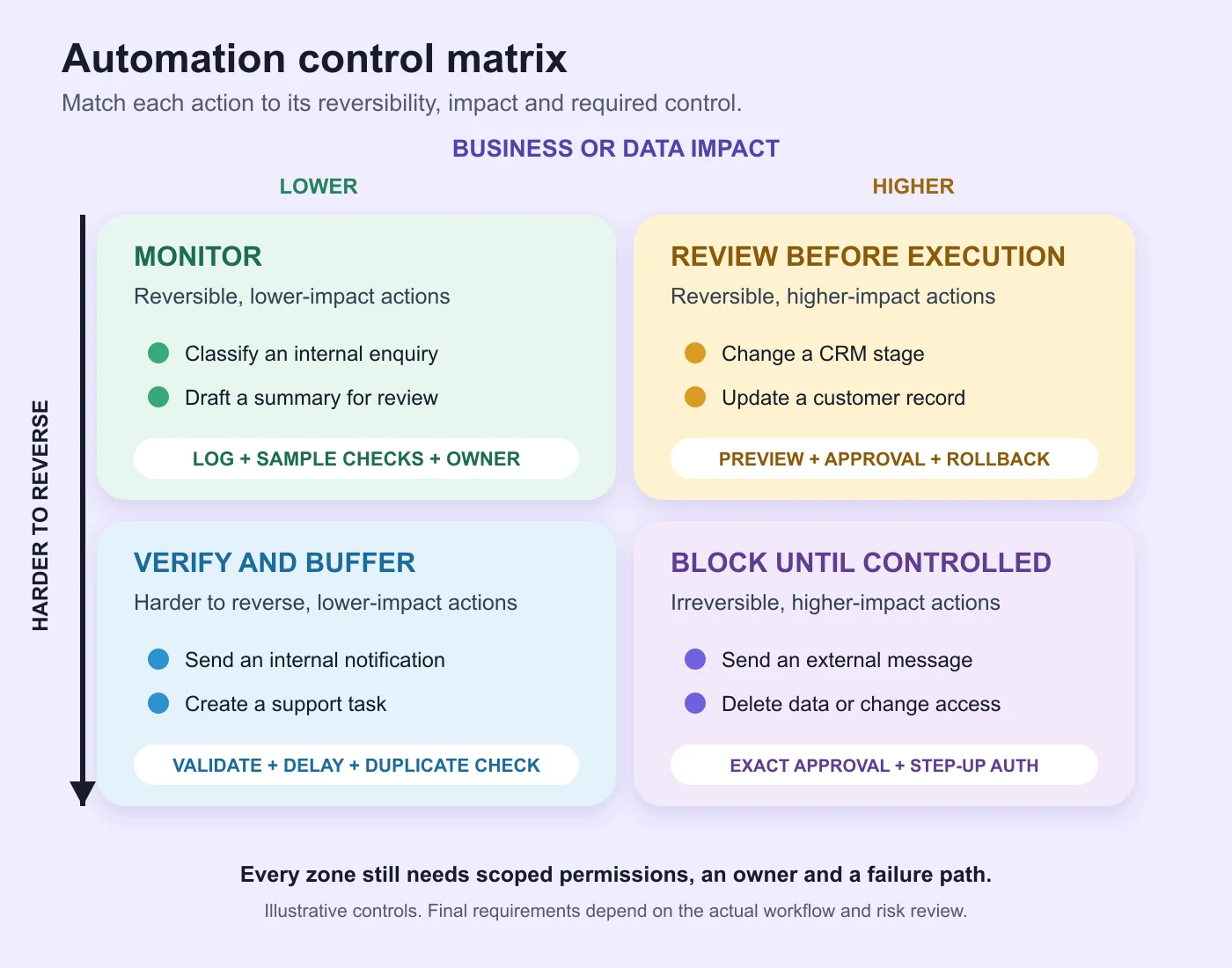
The OWASP AI Agent Security Cheat Sheet recommends explicit approval for high-impact or irreversible actions, clear action previews, audit trails, interruption and rollback. It also recommends that a separate execution component validate the actor, scope, privilege and approval state instead of allowing the agent to approve its own action.
For each approval, show the reviewer what will happen: the target record, material values, external recipient, requested change and expiry time. A generic “approve” button without enough context can turn review into a formality. The workflow should save who approved the action and what exact parameters were accepted.
Limit data and system access
Begin with the smallest set of records and permissions needed for the task. A lead-classification workflow may need to read a submitted enquiry and write a category to one CRM field. It does not automatically need permission to export the full CRM, delete contacts, alter user access, or send email.
OWASP’s guidance on excessive agency recommends limiting tools, functions and downstream permissions. It also advises enforcing authorization in downstream systems rather than asking the model to decide whether an action is allowed. Separate service identities, read-only access where possible, scoped API permissions and restricted environments reduce the consequences of a wrong or manipulated output.
Personal data needs an explicit review. List the fields collected, the purpose, the systems that receive them, retention, access, deletion and any external AI provider involved. India’s Digital Personal Data Protection Act, 2023 and the Digital Personal Data Protection Rules, 2025 are primary references for legal review. A project team should obtain qualified advice for its own processing activities rather than treating an implementation checklist as legal guidance.
Design the failure path before launch
A workflow needs a defined response when an API times out, a record is incomplete, a model returns an invalid structure, a duplicate event arrives, or an approver does not respond. Decide whether the system retries, pauses, creates a task, restores the earlier state, or sends the case to a named queue. Set a limit so a failed task cannot loop indefinitely or create repeated external actions.
Retries should be safe. Use an idempotency key or equivalent control where the receiving system supports it, then reconcile the result before trying again. Keep the original record, the attempted action, the response and the current state. Staff need enough context to resume the case without repeating work or guessing which system is correct.
NIST’s report on monitoring deployed AI systems distinguishes functionality, operational, human-factors, security and compliance monitoring. The report also notes practical barriers such as fragmented logging and the challenge of combining automated monitoring with human validation. Those issues belong in the implementation plan, especially when one workflow spans several vendors.
Keep useful logs without copying sensitive content
An audit record should help answer who initiated an action, what component acted, which record changed, what rule or approval applied, whether the action succeeded, and how the system recovered. Use correlation IDs so one business event can be followed across the automation platform, CRM, application and notification service.
Do not put credentials, access tokens or unnecessary personal content into logs. The OWASP Logging Cheat Sheet recommends protecting logs against tampering and unauthorized access, monitoring access to them, and considering masking, sanitising, hashing or encryption for sensitive fields. Retention should match the business, security and legal purpose instead of continuing indefinitely.
Alerts also need an owner. Define which failures need immediate attention, which can wait for a daily queue, and which are useful only for trend review. An alert with no responsible team or response procedure adds noise without improving recovery.
Connect CRM and business systems with clear ownership
Integration design should name the source of truth for customers, leads, orders, documents and status values. Map every field that crosses a boundary. Record the direction, frequency, validation, duplicate rule, error response and system owner. If two applications can update the same field, define how conflicts are resolved.
Start with a narrow path that proves the most uncertain integration and approval rule. Run representative records through normal cases and failures. Reconcile totals and important values between systems. Expanding the automation is safer after the team can explain what the first path does and how it recovers.
When a workflow needs a custom portal, application or integration layer, the software development company in Bangalore guide explains how to define architecture, security, acceptance criteria and handover. Keep the automation scope and software ownership documented in the same system boundary.
Measure the workflow with operating evidence
Set a baseline before launch. Useful measures depend on the process and may include cases completed, manual touches, approval time, exception rate, duplicate events, failed transfers, reopened cases, or records needing correction. Use the same definition and observation window before and after the change.
Do not treat model usage, token volume or task count as proof of business value. Review whether the workflow produces the intended outcome and whether staff still maintain a shadow process. Capture override reasons because repeated human corrections may reveal a missing rule, unsuitable input, or a step that should remain manual.
The NIST guidance on human-AI interaction recommends defining roles and responsibilities and notes that data about when and why people override AI outputs can help evaluation. The measure should support a decision: keep, revise, narrow or stop the automation.
How to compare AI automation proposals
Give each provider the same workflow brief and ask for assumptions, exclusions and dependencies. Compare proposals on the system boundary, data handling, approval design, permissions, failure recovery, testing, monitoring, handover and support. A tool demonstration is useful only when it reflects the actual records and exceptions the business must handle.
Ask these questions during review:
- Which steps use fixed rules, and which use an AI model?
- What data reaches each platform or model provider?
- Which actions require approval, and what does the reviewer see?
- How are permissions enforced outside the model?
- What happens after a timeout, duplicate event or invalid output?
- Which logs, dashboards, documentation and accounts will the client receive?
- How can the workflow be paused, rolled back or transferred to another provider?
A proposal should also separate platform subscriptions, model usage, implementation, custom software and continuing support. Costs can change with volume, integrations and review requirements, so the estimate needs a clear workload and scope.
Frequently asked questions
What does an AI automation agency do?
It maps a business process, identifies suitable rules and AI-assisted steps, connects systems, builds controls, tests the workflow, and supports deployment. The work may include document extraction, lead routing, support triage, CRM updates, approval workflows, reporting and custom integrations.
Which business processes are suitable for AI automation?
Good candidates have repeated inputs, a clear owner, visible rules, enough examples, and an outcome that can be checked. Processes with changing policies, incomplete records, sensitive decisions, or many exceptions may still benefit from assistance, but they need narrower autonomy and stronger human review.
Does every AI workflow need human approval?
No. Approval should follow the risk of the action. Low-impact, reversible tasks may run automatically under monitored rules. High-impact, irreversible, financial, administrative or externally visible actions should have explicit review, clear context and an audit record.
How much does AI workflow automation cost?
Cost depends on process complexity, records, integrations, security, model usage, platform subscriptions, testing and support. Ask for an estimate that states transaction volume, included systems, approval rules, exclusions and continuing charges. No reliable fixed price exists without that scope.
How long does an AI automation project take?
The schedule depends on access to systems and sample data, the number of integrations, security review, exception handling and acceptance testing. A small first workflow can reduce uncertainty, but the provider should set dates only after confirming the boundary and dependencies.
Prepare the first workflow brief
An AI automation agency in Mahadevapura Bangalore can prepare a useful proposal when the brief names the process, users, records, systems, risks, approvals, failure paths and acceptance evidence. Start with one workflow. Keep permissions narrow, make consequential actions visible to a responsible person, and require enough logging to investigate failures without exposing unnecessary data.
Contact WebEscalate with the current steps, systems, sample records and exceptions for the workflow you want to assess.