Website redesign services in Brookefield Bangalore should solve a defined customer and business problem. For a service company, that usually means helping a visitor identify the right service, understand the scope, verify the provider, and complete an enquiry without getting lost on a phone.
This guide is for consultancies, clinics, property services, training providers, repair businesses, professional firms, and other service companies evaluating an existing website. It covers lead-path audits, mobile design, page structure, accessibility, measurement, performance, and SEO-safe migration. It does not claim a WebEscalate office in Brookefield, a local client result, a fixed turnaround, or guaranteed rankings and leads.
What website redesign services in Brookefield Bangalore should fix
A redesign brief needs a problem statement before it needs a new visual style. Common problems include outdated service information, several pages competing for the same enquiry, weak mobile navigation, forms that fail silently, unclear proof, and analytics that count clicks without confirming a submitted enquiry.
Review the current site with the staff who answer calls and forms. They know which questions recur, where prospects misunderstand the service, and which enquiries arrive without the information needed for a useful reply. Add those findings to search and analytics data. A redesign based only on screenshots can preserve the same friction inside a cleaner interface.
The broader website redesign services Bangalore guide explains the city-level process. This Brookefield page has a narrower job: planning a service-business site around clear enquiry routes and a controlled migration.
Audit enquiry paths before designing screens
Start with the routes a visitor may take from an entry page to a completed action. Search visitors may arrive on a service page or article rather than the homepage. Referral visitors may open an about page first. Returning prospects may go directly to contact details. Each route needs enough context to move forward without forcing a restart from the main menu.
For every important route, record the entry page, question being answered, next useful page, action, confirmation state, and owner who receives the enquiry. Test calls, email links, appointment tools, chat, WhatsApp links, and forms on actual phones. Confirm that submitted data reaches the intended inbox or CRM and that duplicate notifications do not create two records.
Capture a baseline before changing the site. Useful evidence includes landing pages, search queries, form starts, successful submissions, call actions, qualified enquiries, common form errors, and the pages sales staff share during follow-up. The baseline should use agreed definitions. A contact-button click is not the same as a completed or qualified enquiry.
Design the mobile service journey first
A responsive layout must do more than fit inside a smaller screen. A visitor should be able to read the service scope, compare options, inspect proof, reach contact details, and complete the form without zooming or navigating around decorative elements.
Google’s mobile-first indexing guidance says Google uses the mobile version of content for indexing and ranking and recommends responsive web design as the easiest pattern to implement and maintain. Keep important text, links, image alternatives, headings, and metadata available on the mobile version.
Test long service names, validation errors, sticky controls, tap targets, maps, tables, and third-party booking widgets at several widths. A desktop prototype cannot reveal every touch and keyboard problem. The Web Content Accessibility Guidelines 2.2 provide testable criteria for contrast, keyboard access, labels, error identification, and target size. Automated checks help, but task-based human testing is still necessary.
Give every service page one clear job
A useful service page answers a coherent set of questions: who the service is for, what problem it addresses, what is included, what the client must provide, how the work is handled, what evidence is available, and what happens after contact. It should use the language customers recognise rather than internal department names.
Separate pages make sense when the buyer problem, scope, evidence, and search intent are genuinely different. Do not create many near-identical locality pages by changing place names. A Brookefield page needs a distinct buyer context and useful planning detail. City-wide capabilities belong on the main redesign page, while development details can link to WebEscalate’s website development services.
Place proof beside the claim it supports. Use approved case studies, named credentials, relevant process evidence, or a precise explanation of the work. If a local result is unavailable, say what the method includes without inventing a client, number, testimonial, or award.
Reduce friction in forms and contact options
Ask only for information the team can use at the first response. A form can usually begin with name, contact details, service interest, and a short description. Additional fields may be justified for eligibility or routing, but every required field increases effort and needs clear validation.
Write labels that remain visible while a person types. Explain required formats before submission. Put error messages next to the affected field and move keyboard focus to a useful place. After submission, show a confirmation state that says what was received and what happens next without making an unapproved response-time promise.
Test the operational path as well as the interface. Confirm email delivery, CRM creation, source data, consent records, spam controls, attachments, auto-replies, and ownership. A polished form that never reaches the right person is a launch defect.
Measure enquiries with events the team understands
Google Analytics lists generate_lead as a recommended event when a user submits a form or request for information. Google also documents automatically measured form_start and form_submit events. The implementation still needs testing because embedded tools, custom forms, consent settings, and single-page applications can change what is recorded.
Use an event plan that names the action, trigger, page, form, parameters, owner, and verification method. Distinguish a form view, start, validation failure, confirmed submission, booked appointment, and qualified lead. Do not mark every step as a commercial result.
Review reports by landing page, device, channel, service, and enquiry type where the data is sufficient. Sales follow-up, advertising, seasonality, and offer changes can affect outcomes after launch, so website data should guide investigation rather than support a guaranteed conversion claim.
Plan migration and launch as two connected workstreams
A redesign changes the visitor experience and the technical signals behind it. The workstreams need one release plan. Content owners, designers, developers, analytics staff, and search specialists should agree on page decisions before launch week.
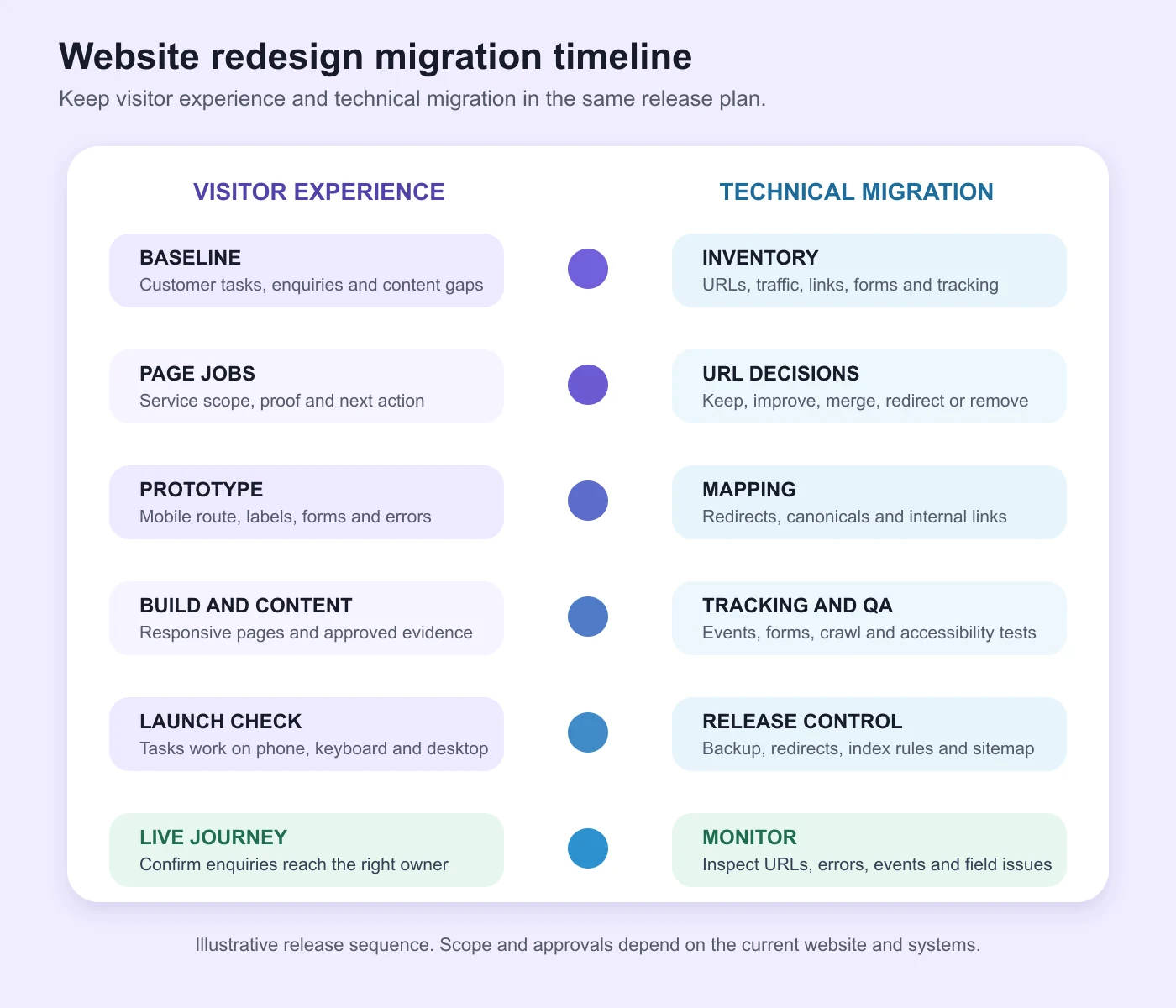
Build a URL inventory with each current page, its purpose, traffic, links, enquiries, content owner, and destination decision. Mark each URL as keep, improve, merge, redirect, or remove. When a URL changes, map it to the closest relevant replacement rather than the homepage.
Google’s site-move guidance recommends updated internal links, self-referencing canonicals, updated sitemaps, tested redirects, and Search Console monitoring. Its redirect documentation recommends permanent server-side redirects such as 301 or 308 for permanent moves. Avoid redirect chains and unrelated destinations.
Before release, crawl the staging build, test important forms and integrations, check robots and index settings, validate structured data where used, review metadata, and verify analytics. Keep a backup and rollback decision. After release, inspect priority URLs, submitted sitemaps, redirect errors, coverage, forms, and real-user issues.
Set performance checks for real page types
Large images, animation, page-builder code, font files, chat tools, maps, and analytics tags can slow a redesigned site. Set budgets before approving the visual system. Test the homepage, service pages, articles, and contact path instead of relying on one easy template.
Interaction to Next Paint measures how quickly a page responds to user interaction. The web.dev guide on optimising INP recommends using field data to identify whether a site needs improvement, then profiling slow interactions. Lab testing helps during development, while field data shows what real users encounter across devices and connections.
Record test conditions and compare the same page types before and after launch. One perfect score on a selected page does not establish performance across the site. Acceptance checks should identify the pages, devices, tools, and issues that block launch.
Ask for acceptance criteria in the proposal
A redesign proposal should separate discovery, content, design, development, migration, analytics, accessibility, performance, training, launch, and support. It should name client responsibilities, third-party costs, approval points, and exclusions.
Ask providers these questions:
- Which data and customer tasks will determine the page priorities?
- Who owns copy, proof approval, design, development, content entry, and testing?
- How will existing URLs, internal links, metadata, and search visibility be protected?
- Which mobile, keyboard, accessibility, and performance checks are included?
- How will form submissions, notifications, CRM receipt, and analytics events be verified?
- What backup, staging, rollback, training, warranty, and continuing support are included?
- Which comparable work can be reviewed with client permission?
For search-specific scope, WebEscalate’s search engine optimisation service explains the wider work around content, technical checks, and measurement. The redesign proposal should state which of those tasks are included instead of using a broad “SEO-friendly” label.
Frequently asked questions
Why should a service business redesign its website?
A redesign is justified when the current site no longer explains the service accurately, fails on important devices, makes enquiries difficult, cannot be maintained, or creates migration, accessibility, performance, and measurement problems that small edits cannot resolve.
What do website redesign services include?
Scope may include research, analytics review, content inventory, information architecture, wireframes, visual design, copy support, development, responsive testing, accessibility checks, integrations, SEO migration, tracking, quality assurance, training, launch, and monitoring. Request a written list because providers package these tasks differently.
How much does a website redesign cost in Brookefield Bangalore?
Cost depends on the number of templates and pages, research, content, custom design, platform, integrations, migration risk, testing, and support. A useful estimate states assumptions, third-party fees, client responsibilities, and optional work. No fixed WebEscalate price is claimed here without an approved scope.
How long does a website redesign take?
The schedule depends on content readiness, decisions, integrations, migration, testing, and client approvals. Ask for milestones and dependencies. A provider should confirm dates after reviewing the current site and scope.
Can a website redesign reduce Google rankings?
Yes. Rankings can change when URLs, copy, internal links, templates, metadata, canonicals, or index settings change. An inventory, redirect map, metadata transfer, crawl checks, sitemap updates, and Search Console monitoring reduce avoidable mistakes but cannot guarantee unchanged positions.
Prepare a useful redesign brief
Website redesign services in Brookefield Bangalore can be evaluated more clearly when the brief names the customer tasks, priority services, current problems, content owners, integrations, URL decisions, and evidence used for acceptance. That keeps the project tied to enquiry quality and a controlled launch.
Share the current website, priority services, known problems, available analytics, and technical dependencies through the WebEscalate contact page. The first review should establish what needs to change, what must stay stable, and how the result will be tested.