
The workflow automation services Texas companies need should solve a visible operating problem before adding more software. A useful first project might route qualified leads, create follow-up tasks, request approval for a quote, or move an order from sales to delivery. The workflow has to handle missing data, duplicate records, expired credentials, and human decisions as carefully as it handles the successful path.
WebEscalate provides workflow automation services for teams that want to connect business systems and reduce repetitive handoffs. Texas businesses can work with the team remotely, without implying a local office. This guide explains what a practical engagement should include, which workflows are good starting points, and how retries, logs, approvals, and ongoing maintenance keep an automation useful after launch.
What workflow automation services include
A workflow automation project begins with the current process. The implementation team identifies the trigger, the data each step needs, the person responsible for exceptions, and the system that holds the final record. Only then does it make sense to choose a platform or build an integration.
The service can include process mapping, CRM configuration, API integration, data transformation, notifications, approvals, dashboards, and support. WebEscalate’s existing service page lists Microsoft, Salesforce, Datadog, cloud tools, and open-source options among its supported areas. For buyers comparing workflow automation services Texas providers offer, the final platform should match the systems already in use, the workflow’s risk, and the people who will maintain it.
A strong scope describes five things in writing:
- What event starts the workflow.
- Which fields are required and how the system validates them.
- Which actions can run automatically and which require approval.
- What happens after a timeout, duplicate, missing value, or unavailable service.
- Who owns monitoring, credentials, changes, and incident response after launch.
Workflow Automation Services Texas sales teams can use
Sales automation works best when it removes routine administration while keeping deal decisions with the team. A website form can create or update a CRM record, assign a lead according to territory or service, schedule a follow-up task, and alert the right owner. Validation should run before any record is written so incomplete submissions do not spread through the pipeline.
Enrollment rules matter. HubSpot’s workflow documentation shows that records may fail to enter a workflow when they do not meet the trigger at the right time, when re-enrollment is disabled, or when suppression rules apply. That is why acceptance testing should cover existing records, new records, repeat submissions, and records that move in and out of the criteria.
Useful sales workflows include:
- Lead capture, validation, deduplication, and owner assignment.
- Follow-up tasks based on inquiry type or pipeline stage.
- Quote or discount approval before a proposal is sent.
- Customer handoff from a closed deal to onboarding or delivery.
- Alerts when a lead or opportunity has not moved within an agreed period.
These automations should leave a readable history. A sales manager needs to see why a record was assigned, which rule ran, and whether a message or update failed.
Operations workflows that reduce missed handoffs
Operations teams often manage requests that cross email, spreadsheets, forms, accounting tools, and project systems. A workflow can collect the request once, check required details, create the work item, notify the owner, and update the requester when the status changes. This is especially useful when the same information is copied between systems.
Approval steps need an explicit owner and deadline. Microsoft’s Power Automate documentation shows how approval flows can route documents or process decisions and then update the source system with the outcome. A practical design also defines what happens when an approver is unavailable, rejects the request, or does not respond before the timeout.
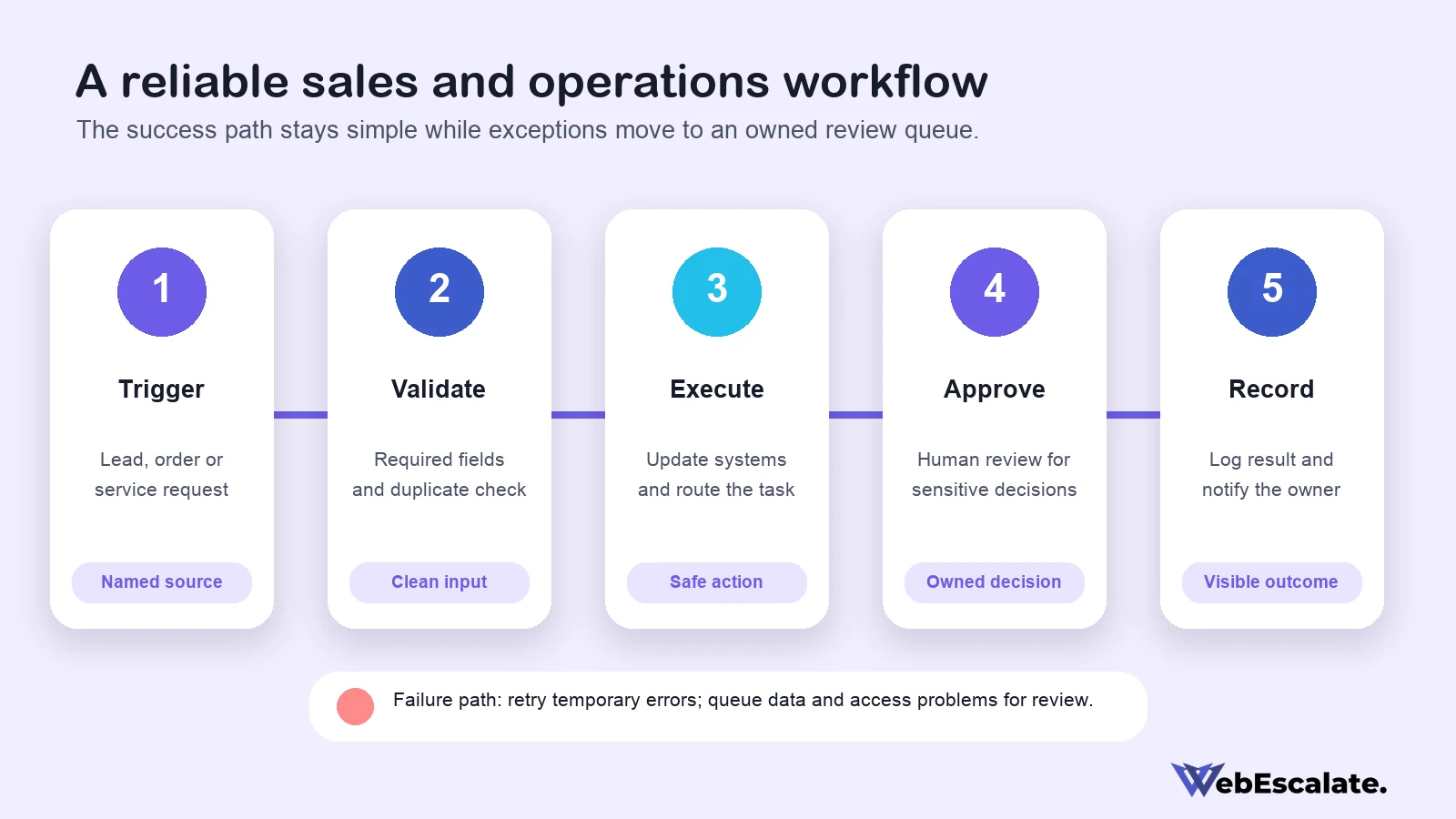
Common operations candidates include purchase requests, sales-to-delivery handoffs, document review, service-ticket routing, recurring report preparation, order-status updates, and employee onboarding tasks. The workflow should automate the predictable path while placing unusual cases in a review queue.
How to choose the first workflow
The first automation should be frequent enough to matter and simple enough to test. A process that already has a stable trigger, clear rules, and one accountable owner is usually easier to automate than a process that changes every week. High-risk decisions involving payments, contracts, access, or sensitive data may still benefit from automation, but the first version should retain human approval.
Score each candidate against the same questions:
- How often does the process run?
- How much manual copying or checking does it require?
- Are the inputs structured and available?
- Can the team state the decision rules clearly?
- What is the impact of a wrong or duplicate action?
- Who will own exceptions and future changes?
This exercise keeps the project tied to an operating need. It also creates the baseline for measuring whether the workflow improved cycle time, reduced manual steps, or lowered the number of unresolved exceptions.
Choosing platforms and integrations
Workflow automation services Texas businesses consider may use the automation features already available in their CRM, Microsoft environment, ecommerce platform, or service desk. Other projects need an orchestration layer such as Make, an open-source tool such as n8n, or a custom integration. The platform decision should follow the process and security requirements.
Ask whether the tool supports the required trigger, data volume, authentication method, approval model, execution history, and error handling. Check where credentials are stored, how access is revoked, and whether a different team member can take ownership. Licensing also matters because a workflow that depends on premium connectors or per-operation pricing can become expensive as usage grows.
Custom code is appropriate when the systems lack a reliable connector, the transformation rules are complex, or the workflow needs a controlled interface. It also creates a maintenance obligation. A proposal for workflow automation services Texas teams will maintain should identify the repository, deployment process, secrets, logs, dependencies, and person responsible for updates.
Retries, timeouts, and failure handling
An automation that works only when every service responds perfectly is unfinished. Microsoft recommends defining alternate paths for failed, timed-out, skipped, and successful actions. Its guidance also covers scoped error handling, retry policies, logging, and notifications. Make provides error handlers and incomplete executions so a failed item can be reviewed or retried without hiding the underlying problem. n8n supports separate error workflows that can receive failure information and alert the owner.
Retries suit temporary failures such as a rate limit or short service interruption. They should use a limit and a delay. Retrying invalid data or an expired credential repeatedly wastes operations and can create duplicate effects. Those cases should stop, record the error, and send the item to a person who can correct the cause.
Every write action also needs an idempotency or duplicate-control strategy. If a CRM update succeeds but the response is lost, the next attempt should confirm the existing result before creating another record. Payment, order, and notification workflows require particular care because an invisible retry can affect customers directly.
Logs that help people fix problems
For workflow automation services Texas managers oversee, logs should answer practical questions: when the run started, which workflow version ran, what business record it handled, where it stopped, and who was notified. Microsoft documents access to run identifiers for logging and debugging, while Make preserves error details and remaining steps in incomplete executions. The implementation should retain enough context to investigate a failure without copying sensitive fields into every log entry.
A simple operating view can track successful runs, warnings, failures, items waiting for review, and the oldest unresolved exception. Alerting should reflect business impact. A failed daily report may wait until working hours; a workflow that prevents new orders from reaching fulfillment needs faster attention.
During handover, the service provider should demonstrate how to find a run, read its error, replay a safe item, and disable the workflow. Documentation should also list the workflow owner and the escalation contact.
Data access and approval boundaries
Each connection should receive only the access needed for its assigned actions. A lead-routing workflow may need to read a form submission and create a CRM record; it does not automatically need permission to export the full customer database. When workflow automation services Texas businesses depend on are documented properly, separate service accounts can make ownership and revocation easier to manage.
Texas businesses that process personal data should review the Texas Data Privacy and Security Act and obtain legal advice for their situation. The Texas Attorney General’s overview discusses privacy notices, consumer rights, data protection assessments, processor contracts, and reasonable data-security practices for organizations within scope. Workflow design should record which systems receive personal data and why.
Human approval belongs before actions that are costly, hard to reverse, or dependent on judgment. Examples include issuing a refund, changing account access, approving a large discount, or sending a contract. The approval screen should show the information needed to make the decision and keep the result in the workflow history.
Maintenance after the workflow launches
Connected systems change. A field may be renamed, a token may expire, a platform may alter its limits, or the business may change an approval rule. Workflow automation services Texas teams rely on therefore need a maintenance model, even when the first release is stable.
A maintenance plan can include scheduled health checks, failure review, credential renewal, dependency updates, small rule changes, and periodic testing with representative records. The team should agree on response priorities and which changes require a new estimate. This prevents a minor process change from turning into an undocumented production edit.
WebEscalate’s delivery process can cover consultation, workflow design, implementation, optimization, and support. The exact scope should identify the supported platforms, included monitoring, response expectations, and handover materials before development begins.
How to evaluate a workflow automation company
When comparing workflow automation services Texas buyers should ask a prospective provider to explain a workflow as a sequence of triggers, validations, actions, approvals, and exceptions. A clear answer is more useful than a long list of tools. The provider should also describe how it prevents duplicates, stores credentials, tests edge cases, and transfers ownership.
For a Texas-focused project, confirm service coverage and working hours without assuming the provider has a local office. WebEscalate delivers this service remotely and connects the work to its broader Texas digital-services content. Businesses that need AI-assisted decisions can also review the separate AI automation agency in Texas guide; conventional workflow automation remains the better fit when rules are stable and auditable.
Before approving a build, request a process map, integration list, acceptance criteria, failure plan, ownership plan, and maintenance scope. Those documents make the proposal easier to compare and give both teams a shared definition of completion.
Frequently asked questions
What is workflow automation?
Workflow automation uses rules and connected systems to move a business task from one step to the next. A trigger starts the process, validations check the inputs, and actions update systems or notify people. Human approvals can remain inside the workflow when the decision needs judgment or carries financial risk.
How are automated workflows set up?
The team maps the current process, selects a useful starting workflow, defines its trigger and required data, then builds and tests each path. Testing should cover successful records, missing fields, duplicates, permission failures, timeouts, and rejected approvals. The workflow can launch after owners know how to monitor and stop it.
Which sales process should a business automate first?
Lead capture and assignment is often a practical first candidate when the routing rules are already clear. Quote approval or sales-to-delivery handoff may be better when delays occur later in the pipeline. Choose the process with stable rules, enough volume to matter, and a named owner for exceptions.
What happens when an automated workflow fails?
A well-designed workflow classifies the failure. Temporary service errors may retry after a delay, while invalid data or expired credentials should stop and notify an owner. The run log should show the affected record, failed step, error, and safe recovery action without exposing unnecessary personal data.
How much do workflow automation services cost?
Pricing for workflow automation services Texas companies request depends on the number of systems, workflow complexity, data volume, connector licensing, testing requirements, and support scope. A useful proposal separates discovery, implementation, platform charges, and ongoing maintenance. WebEscalate can prepare a scoped recommendation after reviewing the current process and systems.
Plan a controlled first workflow
Workflow automation services Texas businesses can maintain begin with a specific process and an accountable owner. The first release should validate inputs, preserve approvals where needed, handle failures visibly, and create enough run history for support. After that workflow operates reliably, the team can apply the same delivery pattern to the next bottleneck.
Contact WebEscalate to map a sales or operations workflow, review the systems involved, and define a practical implementation and maintenance scope.