Website design company in Banashankari Bangalore searches often come from small-business owners who need a clearer way to present their services and receive enquiries. The useful starting point is a short business brief: who the website is for, what it should help them choose, and what the business will do when someone calls, messages or submits a form.
This guide is for small businesses that genuinely serve customers in Banashankari and other parts of Bengaluru. It covers scope, page structure, mobile use, content ownership, accessible forms, maintenance and measurement. It does not claim that WebEscalate has an office in Banashankari, and it does not promise rankings, leads, prices or launch dates that have not been verified for a specific project.
What a website design company in Banashankari Bangalore should define first
Choose one main job for the website. A home-service company may want quote requests for a defined area. A retailer may need product discovery and store enquiries. A training business may want course calls or registrations. If every action is treated as equally important, the homepage usually becomes crowded and the visitor has to work out what to do.
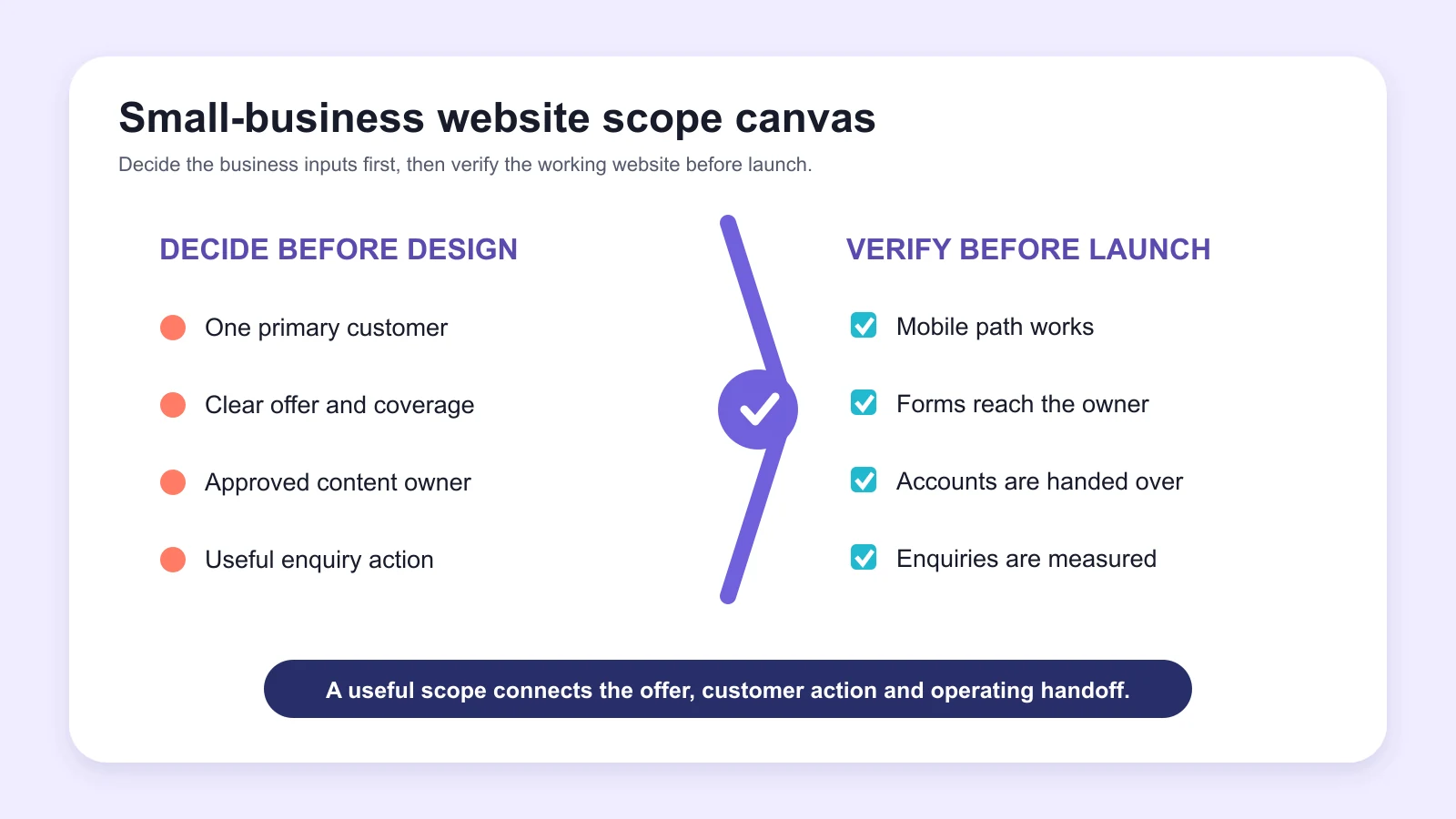
Write down the primary customer, service, location coverage, useful enquiry and person who will respond. Add any conditions that make an enquiry unsuitable, such as work outside the service area or a request the business does not provide. These details shape the page structure, form fields and calls to action.
Google’s people-first content guidance asks whether an intended audience would find a page useful and leave with enough information to achieve its goal. A small-business website should pass that test before extra animation, pages or marketing tools are added.
Keep the page structure lean and useful
A small website does not need to be vague. Give each important service enough space to explain who it suits, what is included, how delivery works and what the customer should do next. Minor related services can share one page when separate pages would repeat the same information.
The homepage can introduce the offer and route visitors to the right service. An about page should use approved facts about the business and people behind it. Evidence may include genuine reviews, authorised project examples, certifications or photographs. The contact page should explain which details help the team respond. Add policy pages that match the information and transactions the site actually handles.
Google Search Essentials recommends helpful, reliable content and placing the words people use in descriptive locations such as titles, headings, alt text and links. That does not require repeating Banashankari in every paragraph. The service details still have to answer the customer’s question.
Design the mobile enquiry path first
Many local customers will first open the site from a phone. Put the core service, area coverage and next action where a mobile visitor can understand them without zooming or closing pop-ups. Phone, WhatsApp, booking and form options should lead to the right person rather than one unattended inbox.
Google uses the mobile version of content for indexing and ranking. Its mobile-first indexing guidance recommends responsive design because the same HTML and URL can adapt across screen sizes. Important content should not appear only after an interaction that a crawler or user may never trigger.
Test the real path on common phone widths. Check the menu, buttons, keyboard behaviour, error messages and confirmation state. A form that technically submits can still fail the business when the confirmation is unclear or the message reaches the wrong address.
Show trust without copying competitor claims
Small businesses often compete with larger companies that have more pages and stronger brands. Useful proof can be simple: accurate contact details, genuine team information, real photographs, approved customer feedback, clear service boundaries and a process the team can explain. A smaller set of verified facts is stronger than a page full of unproven superlatives.
Use local relevance only where it is true. State the neighbourhoods the business genuinely serves, how appointments or visits work, and whether delivery is remote or on site. Do not create a branch address, local team, client or testimonial for the sake of a location keyword.
The broader Bangalore web development company page explains the city-wide service. This Banashankari article has a narrower job: helping a small business commission a manageable website that supports its offer and enquiry process.
Plan content ownership before the site is built
Decide who will provide, approve and update each piece of content. Service descriptions, prices, staff details, opening hours, photographs and policies can change at different speeds. One owner should know which facts need review and where the approved version is stored.
Ask the designer which parts the business can edit safely. A content management system should make routine changes practical without exposing layout controls that can break the page. The handover should cover account access, editor training, image sizes, reusable sections and the process for requesting changes that require development.
Ownership also includes the domain, hosting, analytics property, design files, source code and paid licences. Use named accounts where possible and document renewal dates. A business should not lose access to its website because one freelancer, employee or shared email account disappears.
Make forms accessible and easy to complete
Ask only for information needed to complete the next step. A first enquiry may need a name, reliable contact method, service interest and short description. Long forms can feel intrusive, while forms that collect almost nothing may leave the team unable to respond usefully.
The W3C forms accessibility tutorial recommends visible labels, sensible grouping, clear instructions and useful feedback. These practices help people using screen readers, speech input or keyboard navigation, and they also make forms easier for mobile users.
Include error messages that explain what needs correction and keep the user’s other entries where practical. Confirm successful submission on screen and through the workflow used by the business. Do not request sensitive documents through a normal contact form unless secure handling has been planned and tested.
Set performance and maintenance expectations
Images, page builders, chat tools, tracking scripts and embedded media can slow a site. Compress images, reserve their display dimensions and remove tools that do not support the website’s job. Test service pages and forms, not only a light homepage.
Core Web Vitals cover loading, responsiveness and visual stability through LCP, INP and CLS. These measurements are useful, but performance work also needs realistic device and network testing. A score from one run should not be treated as a permanent guarantee.
Maintenance should have a written boundary. Clarify updates, backups, monitoring, content changes, recovery, plugin or licence renewals and support response. Verify that backups can be restored. The website redesign services in Bangalore guide is relevant when an existing site needs migration, URL preservation or a larger structural change.
Measure enquiries the business can act on
Choose a small set of useful actions before launch: completed forms, calls from the site, booking confirmations, WhatsApp starts or purchases. A button click may indicate interest, but it does not prove that the person completed the action or became a qualified customer.
Google Analytics allows an important event to be marked as a key event. Record the event only after the website successfully completes the intended interaction. Then compare the report with actual enquiries so spam, job applications and unrelated messages do not distort the result.
Small businesses also need a simple review routine. Check whether the correct enquiries are arriving, which pages helped, where people stop and whether the team follows up. Measurement should lead to a specific content, design or operational change.
How to compare website design proposals
Give each provider the same brief and compare the same scope. Check page templates, content responsibility, mobile behaviour, forms, integrations, accessibility, performance, SEO setup, analytics, training, ownership, launch checks and support. Confirm which items are included and which create an ongoing cost.
Ask how approvals are handled and where the site is built before launch. A staging environment should prevent unfinished work from replacing the live site. Confirm browser testing, mobile widths, form delivery, backups and rollback. If the provider uses a theme or page builder, ask how future updates will be managed.
A suitable website design company in Banashankari Bangalore should explain trade-offs in plain language. The decision should follow the business brief, not a large list of features that the team may never use.
Small-business website scope checklist
- Primary customer, service and genuine coverage area
- Main enquiry action and person responsible for follow-up
- Required pages and content owner for each page
- Approved reviews, photographs, credentials and project evidence
- Mobile navigation, calls, messaging, booking and forms
- Accessibility, performance, privacy and security requirements
- Domain, hosting, analytics, licence and source ownership
- Testing, launch, backup, recovery and maintenance plan
This checklist gives designers a consistent problem to quote and solve. It also makes missing content or operational decisions visible before they delay the build.
Frequently asked questions
How much does a small-business website cost in Bangalore?
Cost depends on the number of templates, content work, custom design, forms, integrations, accessibility, e-commerce, migration, testing and support. Request an itemised scope. Confirm hosting, licences, maintenance and content updates rather than relying on one headline price.
How many pages does a small business need?
The right number follows the services and questions customers need answered. A focused site may use a homepage, individual pages for substantial services, about, evidence, contact and required policies. Avoid splitting small variations into repetitive pages.
Should the website use WordPress?
WordPress can suit businesses that need editable pages and a broad integration ecosystem, but it still requires controlled plugins, updates, backups and access management. The platform should follow the content, functionality, ownership and maintenance requirements rather than being chosen automatically.
Does WebEscalate have an office in Banashankari?
This article does not claim a WebEscalate office in Banashankari. WebEscalate can discuss remote delivery and service coverage for businesses in the area. Confirm meeting arrangements and support terms before commissioning work.
Can a designer guarantee Google rankings?
No. Good design and development can support crawlability, mobile use, accessibility, performance and clear content, but rankings also depend on relevance, competition, authority and changes in search systems. A guarantee should be treated cautiously.
Prepare the brief before requesting a quote
A useful quote begins with the customer, service, content, enquiry process and ownership rules. Those decisions help a designer recommend a suitable structure and reduce surprises during build and handover.
WebEscalate can review a small-business website brief for Banashankari and Bengaluru. Use the contact page to share the current website, required services and the action the new site should support. Businesses working on local discovery can also review the local SEO services in Bangalore guide.